
Toucan Smart Home
VuPoint Solutions Inc.Lifestyle
4.5931.00 Reviews
- Version
- 3.3.2 (Build512)
- Installs
- 100.00K
- Age Rating
- Everyone
Screenshots
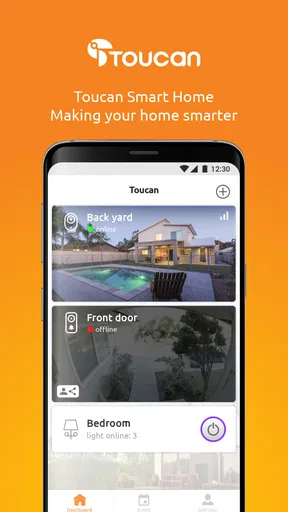
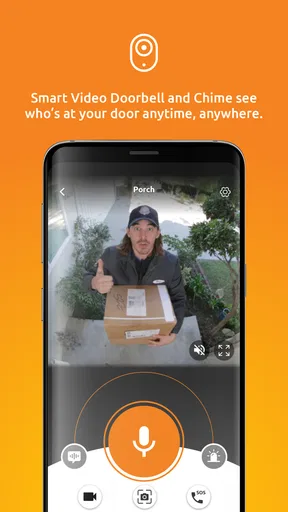
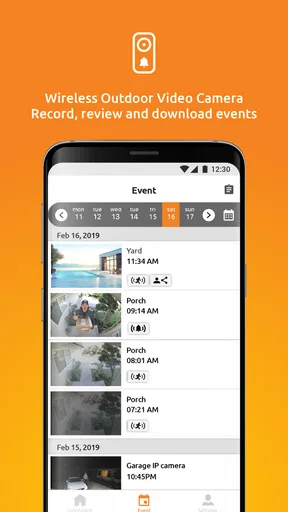
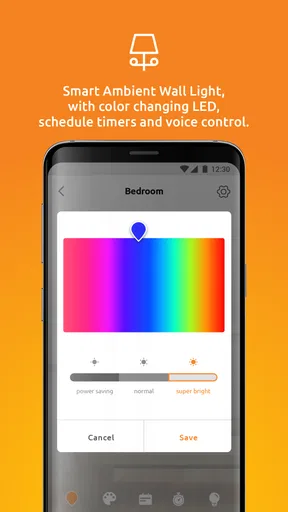
Our Review of Toucan Smart Home
 Analysis by Appyee
I approached Toucan Smart Home as a practical home-monitoring companion rather than just another lifestyle app. Its central promise is the ability to create and customize a secure smart-home setup around Toucan devices, and that focus shapes the whole experience. Instead of trying to become a general household dashboard for every brand, it is built around keeping Toucan equipment accessible from a phone and making everyday checks feel less complicated.
That distinction matters. If you already use Toucan hardware, the app has a clear reason to exist: it gives you a single place to interact with that setup. If you are looking for a broad smart-home platform that brings together products from many manufacturers, I would approach it differently. In my experience, the value here comes from a focused relationship between the app and the Toucan ecosystem, not from endless compatibility.
One focused capability: putting Toucan home security in reach
The strongest part of the app is its role as a control point for a customized Toucan home. The useful idea is not simply that a phone can display information. It is that the phone becomes the practical starting point for checking and managing the security equipment you have chosen for your home.
I like this focused approach because it reduces the mental work involved in a quick check. When I am leaving home, I do not want to navigate through a crowded collection of unrelated smart-home tools. I want to open the relevant app, look at the setup, and decide whether everything is as expected. Toucan Smart Home is designed around that kind of interaction.
The experience is especially appealing to people who prefer a dedicated system instead of assembling separate cameras, sensors, and control apps from different companies. A single-brand setup can be easier to understand, particularly for a household where more than one person needs to know how the system works. The trade-off is that the app’s usefulness depends heavily on whether Toucan’s equipment matches your needs.
Its store summary describes a secure smart home that can be created and customized through Toucan. I found the word “customized” more important than it may first appear. A home is not monitored in the same way in every room. An entrance, a shared living area, and a rarely used side room may each need a different level of attention. The app makes most sense when you treat the setup as a reflection of your routine rather than installing devices without a plan.
What customization changes in everyday use
A good setup begins before the first alert or check. I would decide which areas actually need attention, what I want to know while away, and who in the household needs access. That planning prevents the common smart-home problem of creating too many notifications to be useful. The app can be part of a more deliberate routine: check the important areas, respond to meaningful events, and avoid turning every minor activity into an interruption.
One non-obvious benefit of a dedicated app is consistency. When the same interface is used repeatedly, the physical arrangement of the home and the digital arrangement in the app can become easier to remember. That matters when a notification appears while you are busy. You are more likely to understand its context if the setup reflects the way you think about the rooms and entry points.
I would also recommend treating customization as a household project rather than something only the most technically confident person handles. Show other users where the important controls are and agree on what deserves a response. This is not a flashy feature, but it can make the difference between a security system that is genuinely used and one that gradually becomes background noise.
How the app feels in practice
In daily use, I see Toucan Smart Home as an app for short, purposeful visits. You open it when you need to check the home, adjust the way your Toucan setup is organized, or respond to something that needs your attention. That makes the quality of the first few moments especially important. A smart-home app should not require a long session for a simple decision.
My preferred workflow is to establish the setup carefully, then use the app in brief checks. I would avoid constantly changing the arrangement unless the household routine has changed. A stable configuration makes it easier to recognize when something is unusual, while unnecessary changes can make the system harder to interpret.
There is also a useful difference between remote awareness and remote control. An app can help you stay informed, but it does not replace sensible physical security habits. I would still lock doors, maintain equipment properly, and make sure family members know what to do if something looks wrong. Toucan Smart Home works best as a layer of convenience and awareness, not as a reason to stop thinking about the home itself.
For someone installing the app for the first time, the most important question is whether they already have, or plan to use, Toucan-compatible equipment. The developer is VuPoint Solutions Inc., and the app is clearly presented as the companion for Toucan Smart Home rather than a neutral controller for every device in the house. That makes the decision fairly straightforward: existing Toucan owners have an immediate reason to try it, while people starting from scratch should compare the complete hardware ecosystem before committing.
A realistic evening routine
Imagine leaving work later than expected while a family member is already at home. Instead of calling to ask whether the entrance is secure or whether anyone noticed activity, I would use the app for a quick check of the Toucan setup. The benefit is not dramatic automation; it is reducing uncertainty during an ordinary moment. If the home looks normal, I can continue my journey without another conversation. If something needs attention, I have a prompt to investigate.
Another useful routine is checking the house after everyone has gone to bed. I would use the app as part of a final household pass, alongside locking doors and switching off what needs to be switched off. This is where a customized arrangement helps: the important areas are already familiar, so the check feels like a repeatable habit rather than a technical task.
For a small business owner who keeps equipment or stock at home, the same approach can provide a little extra awareness outside working hours. I would not treat it as a replacement for commercial security, but a Toucan-centered setup may be useful when the goal is simply to keep an eye on a defined residential space without managing a large professional system.
Questions I would settle before relying on it
The first question is whether it works without Toucan hardware. I would not install it expecting a complete smart-home experience on its own. Its purpose is tied to Toucan’s secure-home setup, so the app makes the most sense when there is compatible equipment to configure and monitor.
The second question is whether it is suitable for a shared home. I would judge that by the way the household plans to use the system. If several people need awareness, agree on a simple routine and avoid treating every user as an administrator unless that is genuinely necessary. Clear household habits are more important than giving everyone access to every setting.
The third question is whether it can replace other smart-home apps. In my view, it is better considered a dedicated Toucan companion than a universal replacement. If your home already contains products from several brands, you may prefer a broader platform for general automation and keep this app for Toucan-specific tasks. That approach may involve more than one app, but it can be more realistic than forcing unrelated products into a single ecosystem.
The fourth question is whether the app is appropriate for children. The content rating is Everyone, which makes it broadly accessible as an app, but home-security responsibilities still need adult judgment. I would let younger household members understand the basic routine without assuming they should manage important security decisions alone.
The trade-offs behind a focused smart-home companion
The clearest strength is also the main limitation: focus. A dedicated Toucan experience can feel less confusing than a large platform filled with unrelated device types, but it may feel restrictive if your home is already built around other brands. Before choosing it, I would think about the equipment I own now and the equipment I might want later. A convenient setup today can become less convenient if future purchases require separate controls.
There is also a difference between customization and complexity. More choices can help a household match the system to its rooms, but they can also create a setup that nobody remembers. My practical advice is to start with the smallest useful arrangement, learn the routine, and expand only when a real need appears. This is one of the best ways to avoid notification fatigue and confusing household habits.
Another trade-off is that a security companion is only useful when people keep using it. If the app becomes something you open only during setup, its everyday value drops. I would place it somewhere easy to reach on the phone and connect its use to existing routines, such as leaving for work, arriving home, or going to bed. The app cannot create discipline by itself; it benefits from a routine that already makes sense.
I also would not choose it purely because it is free. The app itself is free to install, but in-app purchases range from around fifty cents to nearly one hundred dollars per item. That does not automatically make it poor value, yet it means I would look at the complete cost of the Toucan setup and any optional purchases before deciding. The right comparison is not “free app versus paid app”; it is the total cost and convenience of one smart-home ecosystem versus another.
That pricing range makes it especially important to distinguish essential use from optional expansion. I would begin with the equipment and functions that solve a clear problem in my home, then consider additional spending only if it improves a routine I actually follow. Buying more devices without a specific purpose can make a smart home harder to manage rather than more secure.
Where alternatives may be better
If you want one broad control center for products from many manufacturers, a general smart-home platform may be a better fit. Those alternatives can be more attractive for users who care about linking lighting, heating, entertainment, locks, and security in one wider system. The cost of that flexibility is often more setup decisions and more opportunities for compatibility issues, but it may suit a mixed-device household better.
If your priority is only occasional monitoring and you do not own Toucan equipment, I would compare standalone security products before installing this app. A different brand may offer a more suitable hardware path, a simpler entry point, or better alignment with the devices already in your home. Toucan Smart Home is not the obvious choice for someone who wants to remain completely brand-neutral.
On the other hand, people who value a contained system may prefer this focused approach. A smaller ecosystem can be easier to explain to a partner, parent, or housemate. It can also make troubleshooting less mysterious because there are fewer companies and apps involved. I would choose that simplicity over theoretical flexibility if the Toucan hardware meets the practical requirements of the home.
Who gets the most from Toucan Smart Home
I think the app is best for existing Toucan users who want a straightforward mobile companion for a customized home-security setup. It is also a reasonable choice for someone planning a new system who prefers to stay within one ecosystem rather than compare a long list of unrelated products. Families and shared households may appreciate the idea of a common place to check the home, provided they agree on responsibilities and avoid overcomplicating the configuration.
It is less suitable for people who want a universal automation hub, users who already rely on another brand’s ecosystem, and anyone expecting the app alone to provide a complete security solution. I would also hesitate if the household is unlikely to maintain a regular checking routine. A smart-home app should support behavior that already has a purpose; it should not become another neglected icon.
The app has a 4.5 average from around six thousand ratings, with more than nine hundred written reviews, and it has passed one hundred thousand installs. Those figures suggest that it has found a meaningful audience, but they do not remove the need to judge it against your own hardware plans. I read them as reassurance that the app is established enough to consider, not as a reason to ignore the ecosystem trade-offs.
It is free, rated for Everyone, and supports Android versions from 7.0 onward. The current release is version 3.3.2, Build 512. Those details make it approachable for many Android users, especially someone using an older phone who does not want to replace the device simply to manage a home setup. I would still keep the app updated when possible, since a security-related companion should not be treated like a disposable utility.
My recommendation after using its approach
I would recommend Toucan Smart Home to a friend who already owns Toucan equipment and wants a dedicated way to organize and check that setup from a phone. Its best quality is not a long list of ambitious functions; it is the way a focused companion can turn home awareness into a repeatable habit. The app is most convincing when the physical devices, the room layout, and the household routine all support one another.
I would not recommend choosing it blindly as a universal smart-home answer. First decide whether Toucan is the ecosystem you want, then keep the initial configuration simple and build around real situations such as leaving home, arriving late, or checking the house before bed. That approach makes the app more useful and reduces the risk of paying for equipment or options that do not improve daily life.
My final view is positive but specific: this is a sensible lifestyle app for Toucan owners who value a contained, customizable smart-home experience. Its real strength is turning a Toucan setup into a practical daily check rather than a collection of devices you forget to use. If that is exactly what you need, it deserves a place on your phone. If you need broad cross-brand automation, I would look elsewhere before building your home around it.
Verdict
Strengths of Toucan Smart Home
- Simple setup for compatible smart home devices
- Remote control from anywhere with an internet connection
- Supports automation for more convenient daily routines
- Centralizes multiple devices in one mobile app
- Useful alerts help you monitor connected devices
Limitations of Toucan Smart Home
- Compatibility may be limited to Toucan-supported products
- Some features require a stable Wi-Fi connection
- Cloud-dependent controls may stop during service outages
- Advanced customization options may feel limited
- Background connectivity can increase battery usage
Similar Picks in This Category
View All
SmartThings
Samsung Electronics Co., Ltd.4.6

Google Home
Google LLC4.0

Pinterest4.2

Astrotalk - Talk to Astrologer
Astrology & Horoscope4.7

My Verizon
Verizon Consumer Group4.5

Samsung Wallet (Samsung Pay)
Samsung Electronics Co., Ltd.4.1
Frequently Asked Questions
What is Toucan Smart Home, and what can I use it for?
Toucan Smart Home is a home-monitoring and security app designed to help you manage compatible Toucan devices from an Android or iOS phone. Depending on the products you own, it can let you view live camera feeds, receive motion or activity alerts, review recordings, communicate through supported two-way audio, and adjust device settings. Its exact features depend on your Toucan hardware and subscription plan.
Do I need a Toucan device to use the Toucan Smart Home app?
Yes. The app is primarily a companion for compatible Toucan smart-home products, such as security cameras, doorbells, and other monitoring equipment. Installing the application by itself will not provide access to live video or security functions. Before downloading, check the app listing and Toucan’s compatibility information to confirm that your specific device, phone model, operating system, and Wi-Fi setup are supported.
How do I connect my Toucan device to the app?
After installing Toucan Smart Home, you generally need to create or sign in to a Toucan account, allow the requested permissions, and follow the in-app pairing instructions. The device normally connects through your home Wi-Fi, so having the network name and password available is helpful. Keep the camera or doorbell near the router during setup, and make sure Bluetooth, location, or local-network access is enabled if the app requests it.
Does Toucan Smart Home require a subscription?
The app may be available to download without charge, but some advanced services can depend on the Toucan device and account plan you use. Basic functions, such as device setup or live viewing, may be included, while cloud recording, longer video history, enhanced notifications, or additional storage could require a paid subscription. Review the current pricing and included features before purchasing hardware or relying on cloud-based recordings.
Is Toucan Smart Home safe and reliable for home security?
Toucan Smart Home can be useful for checking your property remotely, but it should be treated as a monitoring aid rather than a guaranteed replacement for a professional alarm system. Reliability depends on your internet connection, Wi-Fi coverage, device power, phone notifications, and Toucan’s cloud services. Use a strong unique password, enable available account security options, update the app and firmware, and position devices carefully for dependable coverage.
